This feed contains pages with tag "pdf".
Today I was wondering about converting a pdf made from scan of a book
into djvu, hopefully to reduce the size, without too much loss of
quality. My initial experiments with
pdf2djvu were a bit
discouraging, so I invested some time building
gsdjvu in order to be able
to run djvudigital.
Watching the messages from djvudigital I realized that the reason it
was achieving so much better compression was that it was using black
and white for the foreground layer by default. I also figured out that
the default 300dpi looks crappy since my source document is apparently
600dpi.
I then went back an compared djvudigital to pdf2djvu a bit more
carefully. My not-very-scientific conclusions:
- monochrome at higher resolution is better than coloured foreground
- higher resolution and (a little) lossy beats lower resolution
- at the same resolution,
djvudigitalgives nicer output, but at the same bit rate, comparable results are achievable withpdf2djvu.
Perhaps most compellingly, the output from pdf2djvu has sensible
metadata and is searchable in evince. Even with the --words option,
the output from djvudigital is not. This is possibly related to the
error messages like
Can't build /Identity.Unicode /CIDDecoding resource. See gs_ciddc.ps .
It could well be my fault, because building gsdjvu involved guessing at corrections for several errors.
comparing
GS_VERSIONto 900 doesn't work well, whenGS_VERSIONis a 5 digit number.GS_REVISIONseems to be what's wanted there.extra declaration of struct timeval deleted
-lz added to command to build mkromfs
Some of these issues have to do with building software from 2009 (the
instructions suggestion building with ghostscript 8.64) in a modern
toolchain; others I'm not sure. There was an upload of gsdjvu in
February of 2015, somewhat to my surprise. AT&T has more or less
crippled the project by licensing it under the CPL, which means
binaries are not distributable, hence motivation to fix all the rough
edges is minimal.
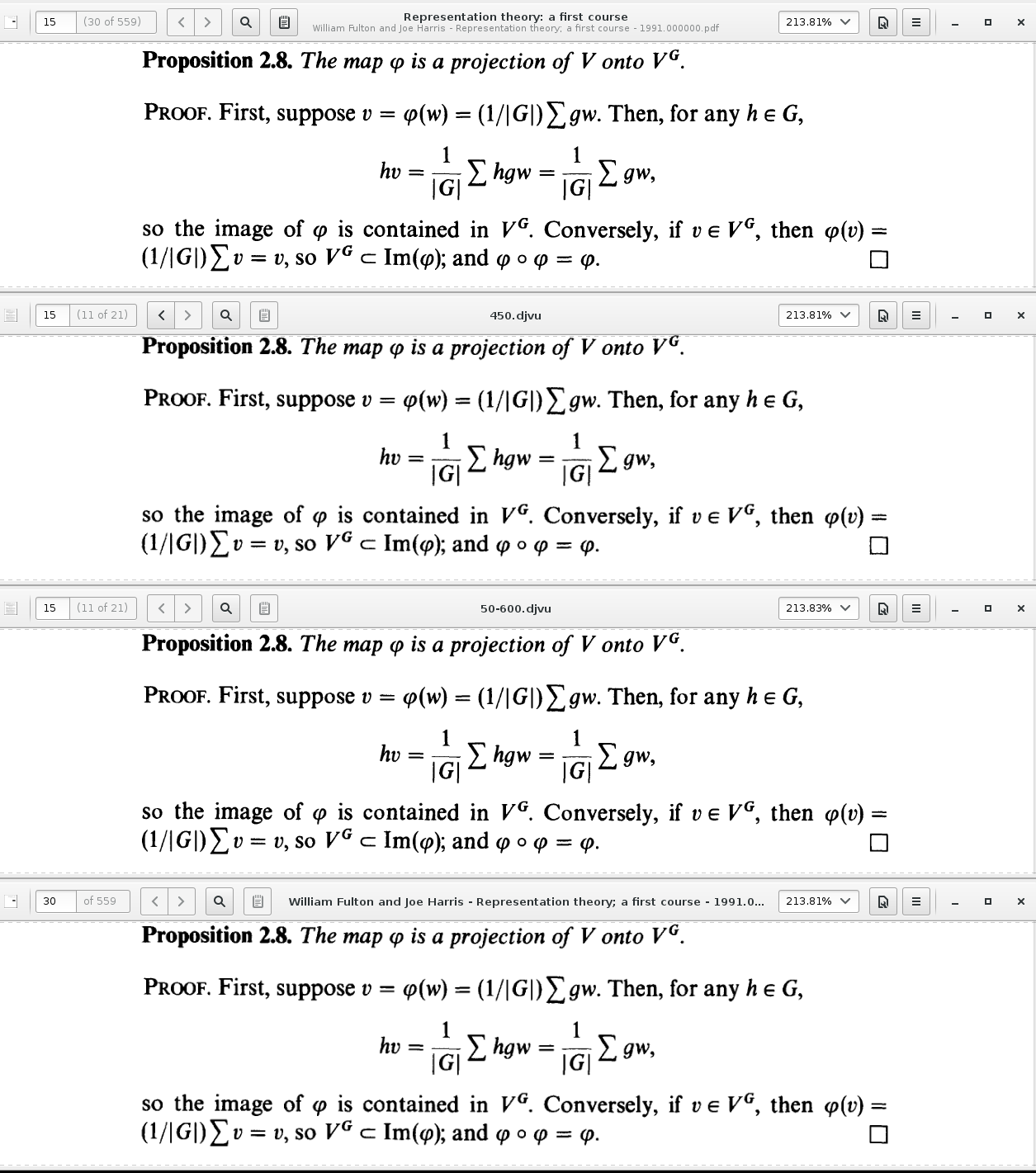
| Version | kilobytes per page | position in figure |
|---|---|---|
| Original PDF | 80.9 | top |
| pdf2djvu --dpi=450 | 92.0 | not shown |
| pdf2djvu --monochrome --dpi=450 | 27.5 | second from top |
| pdf2djvu --monochrome --dpi=600 --loss-level=50 | 21.3 | second from bottom |
| djvudigital --dpi=450 | 29.4 | bottom |
It turns out that pdfedit is pretty good at extracting text from pdf files. Here is a script I wrote to do that in batch mode.
#!/bin/sh
# Print the text from a pdf document on stdout
# Copyright: (c) 2006-2010 PDFedit team  <http://sourceforge.net/projects/pdfedit>
# Copyright: (c) 2010, David Bremner <david@tethera.net>
# Licensed under version 2 or later of the GNU GPL

set -e

if [ $# -lt 1 ]; then
    echo usage: $0 file [pageSep]
    exit 1
fi

#!/bin/sh
# Print the text from a pdf document on stdout
# Copyright: © 2006-2010 PDFedit team  <http://sourceforge.net/projects/pdfedit>
# Copyright: © 2010, David Bremner <david@tethera.net>
# Licensed under version 2 or later of the GNU GPL

set -e

if [ $# -lt 1 ]; then
    echo usage: $0 file [pageSep]
    exit 1
fi

/usr/bin/pdfedit -console -eval '
function onConsoleStart() {
    var inName = takeParameter();
    var pageSep = takeParameter();
    var doc = loadPdf(inName,false);

    pages=doc.getPageCount();
    for (i=1;i<=pages;i++) {
        pg=doc.getPage(i);
        text=pg.getText();
        print(text);
        print("\n");
        print(pageSep);
    }
}
' $1 $2
Yeah, I wish #!/usr/bin/pdfedit worked too. Thanks to Aaron M Ucko for pointing out that
-eval could replace the use of a temporary file.
Oh, and pdfedit will be even better when the authors release a new version that fixes truncating wide text
So you have a pdf form, and you want to fill it in on linux. You hate acrobat reader. Ok, so all six of you read on.
First install pdftk. If you are using debian,
apt-get install pdftk
If you are not using debian, first install debian :-).
Now you need a pdf file with form data. We suppose for the sake of
argument that your file is foo.pdf. Try
pdftk foo.pdf dump_data_fields
Yes, the order of arguments is goofy. You should get some output that looks like
FieldType: Text
FieldName: M3
FieldFlags: 4194304
FieldJustification: Left
---
FieldType: Text
FieldName: D3
FieldFlags: 4194304
FieldJustification: Left
M3 and D3 are your field names. Now get my script which can convert this output into something useful. At this point you may want to reconsider how much you hate acrobat. Or investigate okular. Assuming you are still here, run
pdftk foo.pdf dump_data_fields | perl fields2pl.pl > foo.pl
This will give you a template that you can fill in. If you have to
fill out the same form many times (e.g. an expense form), save this
template somewhere. Now to fill in your form, you need a FDF file.
One way to make one is to edit the template I made you create above,
and then convert it to FDF. First install the FDF converter.
apt-get install libpdf-fdf-simple-perl
Now use something like genfdf.pl to make an fdf file.
perl genfdf.pl foo.pl > foo.fdf
You are almost there. To actually fill in the form, you use the command
pdftk foo.pdf fill_form foo.fdf output filled.pdf
If you do this all many times, consider making a Makefile. Here is a fragment
.SUFFIXES: .pdf .fdf .csv .gnumeric .pl


.fdf.pdf:
    pdftk Expenses.pdf fill_form $< output $@


.pl.fdf:
    genfdf.pl $< > $@


example.pdf: example.fdf
example.fdf: example.pl