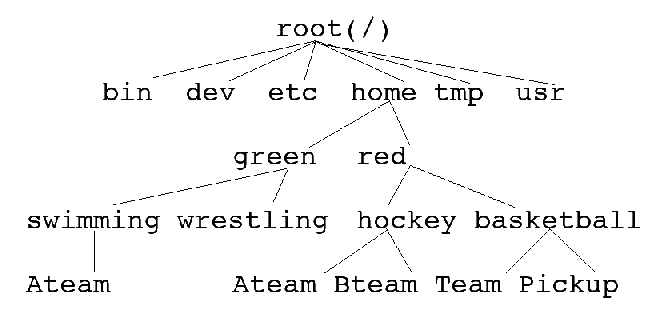
-
What are the absolute pathnames for: root, bin, green,
and Pickup? (2 points)
-
Suppose that basketball is your working directory. What are the
relative pathnames of root, bin, green and wrestling?
(2
points)
Suppose that green is now your working directory. Show
how you could accomplish the following tasks using a single command:
-
List the contents of the basketball directory. (1 point)
-
List the contents of the swimming directory. (1 point)
-
Make a copy of red's hockey Ateam file and place
it in the wrestling directory with the name Trial. (1
point)
Suppose that red is now your working directory. Show how
you could accomplish the following:
-
Copy the contents of the basketball directory into red's
hockey
directory. (1 point)
-
Delete the basketball directory and all the files inside it. (1
point)
-
Change the name of red's hockey directory to teams.
(1
point)
-
Make a new directory inside the teams directory called reserve(1
point)
-
Assuming you have completed the above questions, draw the current directory
structure of the red directory. (4 points)
-
(2 points) Create a file called sig in your home directory
that contains your full name, program (e.g., Computer Science) and e-mail
address. For example:
Eric Aubanel
Computer Science
aubanel@unb.ca
Once you have this file created, use the cat command to display
its contents.
-
(1 point) From your home directory, create a subdirectory for each
of 8 assignments (such as: assn1, assn2, ...).
-
(1 point) List the contents of your home directory, redirecting
the output to a file called dlist.
-
(1 point) Move this file to the directory for assignment 1.
-
(1 point) In the directory for assignment 1 create a file, oneline.c,
containing the following:
#include <stdio.h>
int main()
{
int c;
while((c = getchar()) != EOF){
if(c != '\n') putchar(c);
else putchar(' ');
}
putchar('\n');
return 0;
}
Compile oneline.c, and store the executable in a file called
oneline.
-
(1 point) Run oneline, redirecting stdin to the file dlist
you created in 4 above and stdout to a file called dlist1.
-
(1 point) Using oneline and a pipe, list the contents of
your directory for assignment 1 on one line.
Now, you will run oneline without redirecting stdin or
stdout:
-
(2 points) Run oneline, and type some characters followed
by the <enter> key. Then type more characters, again followed by <enter>.
Notice that the output is not displayed until after each <enter>. Explain
this behaviour using the concept of an I/O buffer.
-
(1 point) How can you terminate the input to oneline?
-
(2 points) Run oneline, type some characters followed by
ctrl-d, without typing <enter> first. Explain what happens.
-
(2 points) Finally, exit the shell you were using to do the above,
using a keystroke (i.e., not using your mouse). Why does this keystroke
work?